The best appliance repair software in 2026

The short version
- Best overall for an appliance repair shop
- Jobber — Cheap seats and easy follow-up visits, which is the shape of nearly every job you do.
- Best for a service crew
- Housecall Pro — Flat-rate price book and a dispatch board that handles real call volume.
- Best cheap option
- QuoteIQ — $29.99/mo if you are solo and mainly need invoices out and cards taken.
Appliance repair software, appliance repair business software
One category, two names, and this page covers both.
Who this is for
One to eight technicians repairing domestic appliances — washers, dryers, refrigerators, ovens, dishwashers. Mostly in-home calls, a diagnostic fee, and a job that frequently becomes two visits because the part is not on the van.
Appliance repair is a two-visit trade, and that is the thing to judge software on. Diagnose, order, return. Anything that makes the return visit easy to schedule and hard to forget is worth more than any dashboard.
The comparison
| Tool | Starts at | Users included | Best for | Verdict |
|---|---|---|---|---|
| Jobber | $49/mo | 1 | One to four technicians | Cheap seats, easy follow-up visits |
| Housecall Pro | $79/mo | 1 | Five to eight technicians | Price book + dispatch board |
| ServiceTitan | Quote only | Unlimited | Ten technicians and up | Real parts and warranty tracking |
| QuoteIQ | $29.99/mo | 1 | Solo technicians | Cheapest; built for exterior trades |
Jobber — best value for a small shop
$49/mo · One to four techniciansThe default field service platform for small home service businesses, and the one most operators compare everything else against.
For a shop under about five people, Jobber is the sensible default. Creating a follow-up visit against the same client takes seconds, and you can do it standing in the customer’s kitchen with the part number in front of you — which is exactly when it should be done.
The diagnostic fee saves as a line item and goes on every job. The customer gets a professional invoice with a payment link rather than a scribbled total, which in a trade competing with “a man who does fridges” is worth something.
Seats at $29 keep it viable as you add a second technician; a three-person shop is $107/mo.
The gap is parts and warranty. You can note the model and serial, but there is no structured equipment record telling you a unit is still under manufacturer warranty. For a small shop that is a spreadsheet problem, not a dealbreaker.
What it does well
- The most polished product in the category. Onboarding is fast and the mobile app is the one crews complain about least.
- Client-facing experience — booking page, quote approvals, payment — is a step above everything cheaper.
- Deepest integration list, so it fits whatever you already run the books in.
What it does badly
- The advertised entry price is one user. Seats are $29/mo each on every tier, so a three-person crew on Core is $107/mo, not $49.
- Automation that most operators consider essential — reminders, follow-ups — is Connect and up, a 2.8x jump from Core.
- Prepaid annual pricing is what the marketing quotes; the no-commitment monthly number is meaningfully higher.
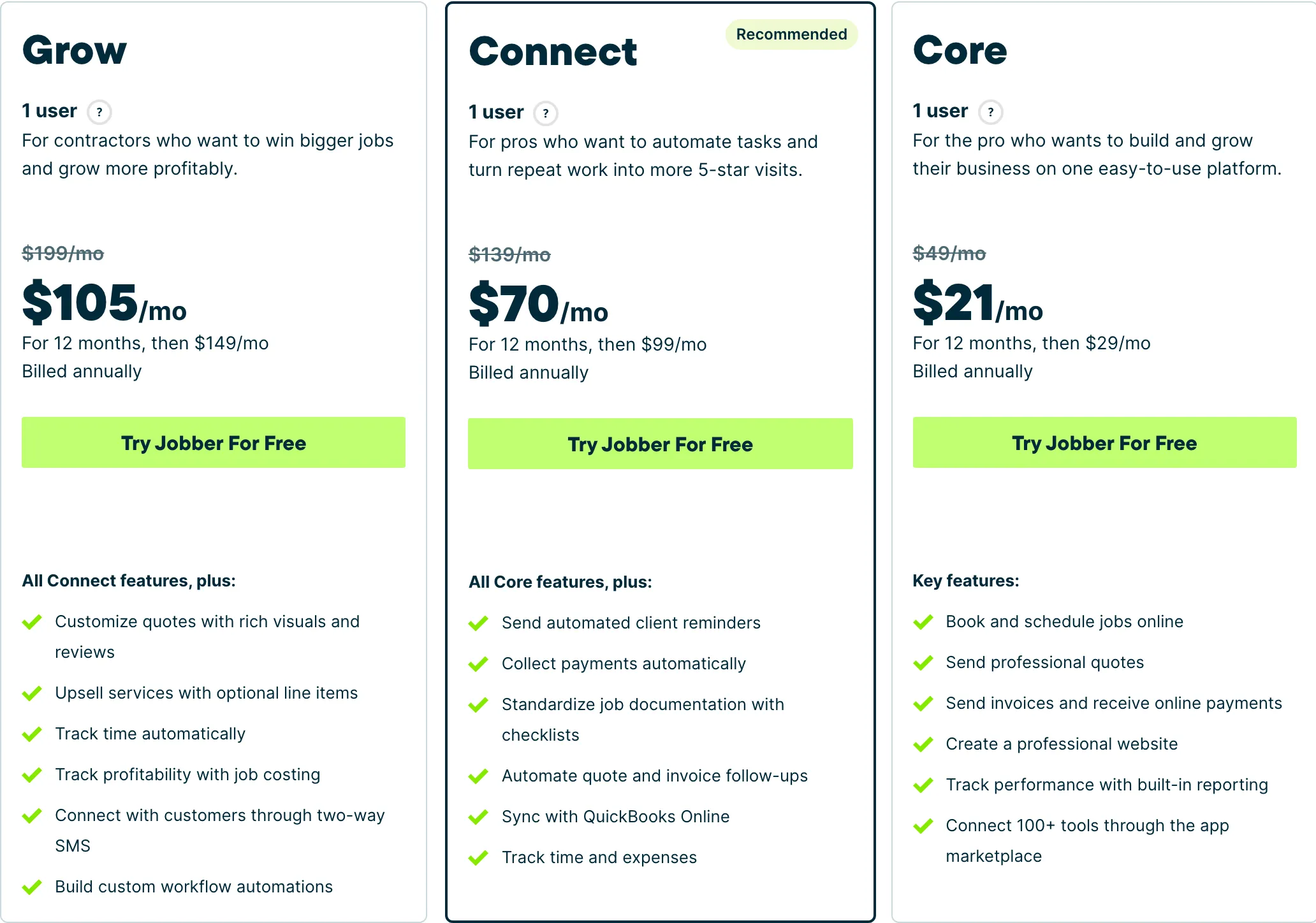
Who it fits: One person to a mid-size crew. The Core tier is genuinely usable solo; the useful automation starts at Connect.
Housecall Pro — best for a service crew
$79/mo · Five to eight techniciansJobber’s closest competitor, priced for teams rather than solos, with stronger dispatch and marketing tooling.
The flat-rate price book is the reason to move up. Appliance repair is repeatable work — the same fault on the same model is the same job — and a structured price book means two technicians quote it identically. That consistency is worth more than it sounds when a customer rings for a second opinion from your own company.
The dispatch board handles the volume of short calls this trade generates better than Jobber’s, especially when a morning job overruns and the afternoon needs reshuffling.
Essentials at $189/mo includes five seats. Ignore Basic at $79 for one user, and go to Max at $329 rather than paying $100 for a sixth Essentials seat.
What it does well
- Five seats included on Essentials is the best seat-per-dollar deal of the three once you are past two people.
- Dispatch and routing are stronger than Jobber’s at the equivalent tier.
- Recurring service plans on Max are genuinely good if you sell maintenance contracts.
What it does badly
- Worst entry price in the category: $79/mo for a single user, 60% more than Jobber Core for less.
- Extra seats on Essentials are $100/mo — the most expensive seat of any tool here.
- Add-on pricing is not published. You will get those numbers on a sales call, not off the website.
Who it fits: Two to eight people. The seat maths only starts working in your favour once you have a crew.
ServiceTitan — the one that does parts properly
Quote only · Ten technicians and upEnterprise field service management for multi-truck operations, sold through a sales process rather than a pricing page.
Named for completeness, but it deserves a real note here: ServiceTitan is the only tool on this page that models a customer’s equipment properly — make, model, serial, install date, warranty status — and tracks parts and van inventory against it.
For a large appliance repair operation that is genuinely valuable, because knowing a unit is under warranty changes who pays. Below about ten technicians it is far more machinery than the job needs. No published pricing, an annual contract, a paid implementation.
What it does well
- Nothing else touches it for a large operation: reporting, payroll, inventory, call tracking, financing at the door.
- Built for a business where somebody’s full-time job is dispatch.
What it does badly
- No published pricing, an annual contract and an implementation fee. This is not a tool a solo operator buys.
- For a one to four person crew it is the wrong product at any price — you would use perhaps a tenth of it.
Who it fits: Ten trucks and up, with an office manager whose job includes running the software.
QuoteIQ — cheapest, with a caveat
$29.99/mo · Solo techniciansField service software built for exterior cleaning and outdoor home service crews, with property measurement baked into the quote.
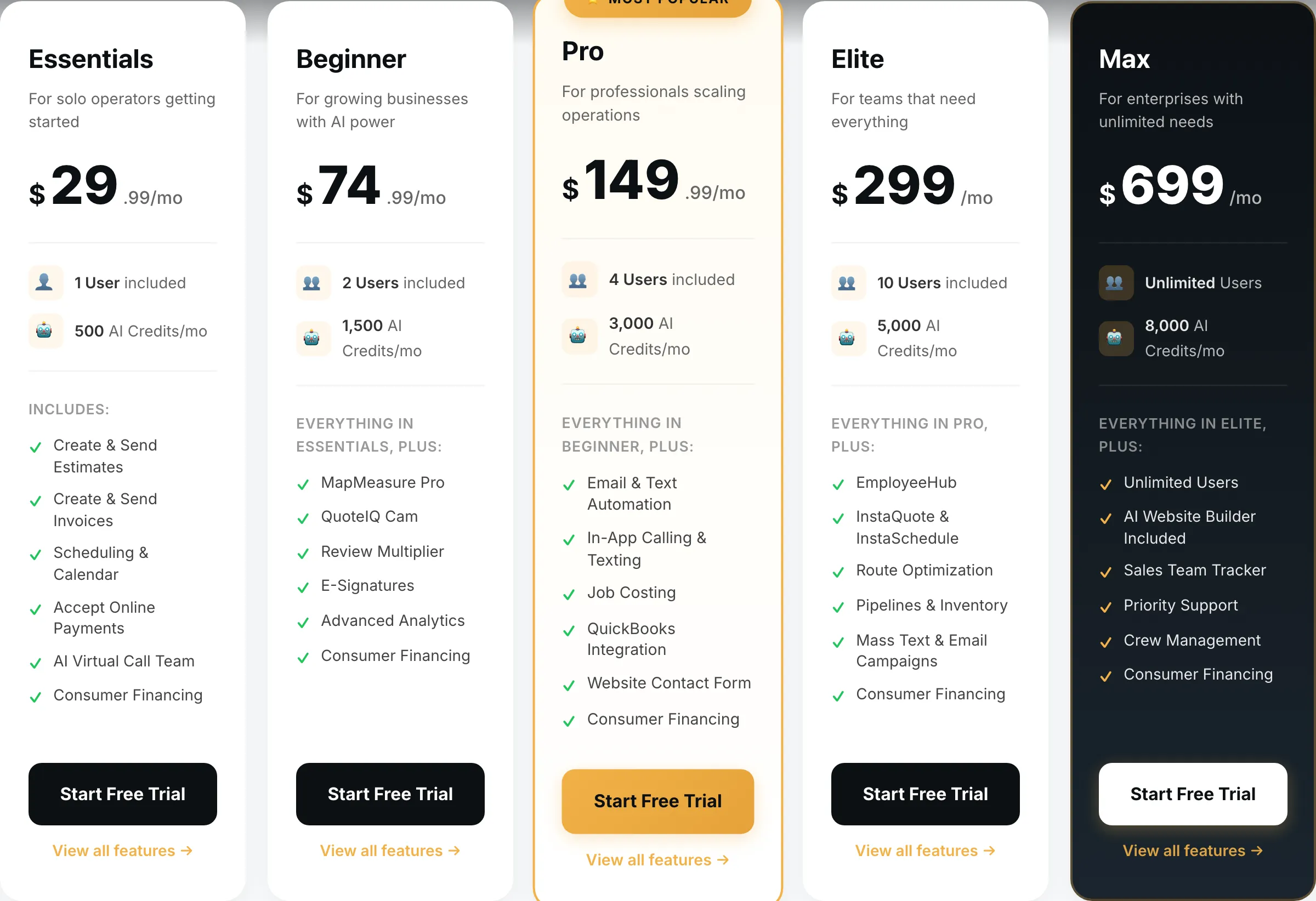
$29.99/mo is the cheapest working option, and for a solo technician replacing a notebook it is a real improvement — invoices out, cards taken, jobs scheduled.
But be honest about fit: QuoteIQ is built around exterior and outdoor trades. The satellite measurement feature is useless to you, there is no price book, and no equipment record. It is the general half of a product designed for a different trade.
Reasonable if $29.99 versus $49 genuinely decides it. Otherwise Jobber fits better.
What it does well
- Cheapest real entry point of anything in this category — $29.99 gets a working quote-to-invoice loop, not a crippled trial tier.
- MapMeasure Pro measures a property off satellite imagery, which is the actual job on a lawn, driveway or roof quote.
- Every tier includes the features. No add-on menu bolted on at checkout.
What it does badly
- Smaller company than the incumbents. Fewer integrations, and you will occasionally be the person filing the bug.
- Built around exterior and outdoor trades. If you run commercial mechanical, this is the wrong shape.
- Seat counts are tight below Elite — a four-person crew is already on the $149.99 tier.
Who it fits: Solo operator to a four-person crew, mostly exterior cleaning and outdoor work.
How we picked
Prices read off each vendor’s own pricing page on 31 August 2026, no-commitment monthly rate with seats added.
For appliance repair we weighted follow-up visit handling above everything else, because the two-visit job is the trade; then pricing consistency across technicians; then equipment and warranty records, where we have said plainly that only one of the four does it properly.
We earn nothing from Jobber or ServiceTitan, and both are recommended above the tool that pays us where they fit better.
What we would do
Solo: Jobber Core at $49, or QuoteIQ at $29.99 on the tightest budget.
Two to four: Jobber Core with seats.
Five to eight: Housecall Pro Essentials at $189 for the price book.
Ten or more, warranty work a real share of revenue: ServiceTitan.
Questions operators actually ask
What software do appliance repair companies use?
Small shops mostly run Jobber or Housecall Pro. The distinguishing need is the second visit: you diagnose, order a part, and come back. Whichever tool you choose has to make that two-visit job easy, because it is most of your work.
How do I handle the diagnostic fee?
Charge it, invoice it at the first visit, and credit it against the repair if they go ahead. Save it as a standard line item so it goes on every job automatically. Shops that skip the diagnostic fee end up doing free consultancy for customers who then buy a new machine.
Can these track parts and warranty?
Only ServiceTitan does it properly, with parts and warranty status against a customer's equipment. The other three store the appliance model and serial as notes or custom fields, which works for a small shop but will not tell you which units are still under manufacturer warranty.
How do I schedule the return visit?
Create it as a follow-up job on the same client while you are still standing in the kitchen, with the part on order noted against it. All four support this. Doing it later, from memory, is how return visits get forgotten — and a forgotten return visit is a customer who buys a new appliance instead.
Is a flat-rate price book worth it?
Once you have two or more technicians, yes. Appliance repair is highly repeatable — a specific fault on a specific model is roughly the same job every time — and a price book stops two techs quoting differently for it. Housecall Pro includes one from Essentials.