The best excavation software in 2026

The short version
- Best of these for small dirt work
- Jobber — Multi-day jobs, day-rate lines and deposits, at $49/mo plus $29 seats.
- Best cheap option
- QuoteIQ — $29.99/mo for quoting and invoicing residential excavation.
- Best with a few staff
- Housecall Pro — Five seats at $189/mo and structured photo reports for site condition.
Be clear which business you are in
Residential dirt work — footings, drainage, driveways, pads, small demolition, pool digs — is quoted per job or per day, scheduled like any other trade, and invoiced when it is done. A general field service tool covers that well, and that is what this page compares.
Commercial sitework is a different business. You bid off a survey, calculate cut-and-fill volumes, run grade control on the machine, and submit pay applications against a schedule of values. That belongs to construction estimating software and machine-control systems. Nothing on this page will help, and forcing a field service tool into that role wastes your time.
If you are the first, read on. If you are the second, this is not your page.
Who this is for
An owner-operator with a machine or three, doing residential and light commercial dirt work. You quote off a site visit, you bill by the day or the job, and your biggest financial risks are hitting something you did not expect and not being paid.
The comparison
| Tool | Starts at | Users included | Best for | Verdict |
|---|---|---|---|---|
| Jobber | $49/mo | 1 | One to three machines | Multi-day jobs, day rates, deposits |
| QuoteIQ | $29.99/mo | 1 | Solo operators | Cheapest quoting and invoicing |
| Housecall Pro | $79/mo | 1 | Five or more staff | Five seats, photo reports |
| ServiceTitan | Quote only | Unlimited | Large service operations | Quote-only, service trades |
Jobber — best of these for dirt work
$49/mo · One to three machine operatorsThe default field service platform for small home service businesses, and the one most operators compare everything else against.
Jobber handles a job that runs three days with a machine, an operator and a haul-off better than the alternatives at its price. Day-rate and mobilisation lines save as line items, deposits collect at approval, and the balance invoices on completion.
The deposit matters. Excavation ties up expensive equipment and often fuel and disposal costs before you see a dollar, and taking money at signing is the difference between a business and a loan.
Photos on the job are your record of site condition before you arrived — which in a trade that moves heavy machines across someone’s lawn is worth building into your routine.
Core is $49/mo plus $29 per seat. No volume takeoff, no equipment hours, no telematics.
What it does well
- The most polished product in the category. Onboarding is fast and the mobile app is the one crews complain about least.
- Client-facing experience — booking page, quote approvals, payment — is a step above everything cheaper.
- Deepest integration list, so it fits whatever you already run the books in.
What it does badly
- The advertised entry price is one user. Seats are $29/mo each on every tier, so a three-person crew on Core is $107/mo, not $49.
- Automation that most operators consider essential — reminders, follow-ups — is Connect and up, a 2.8x jump from Core.
- Prepaid annual pricing is what the marketing quotes; the no-commitment monthly number is meaningfully higher.
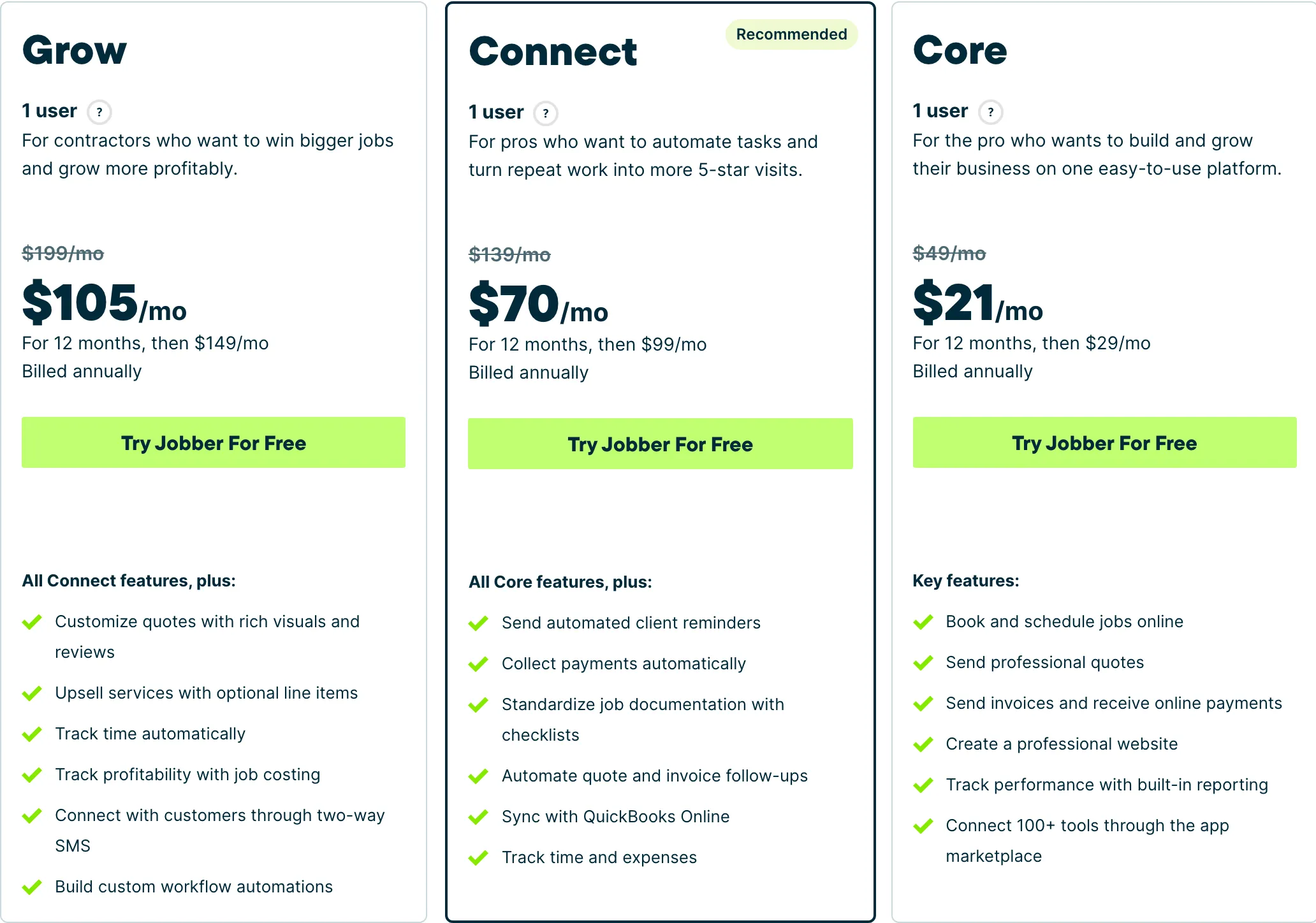
Who it fits: One person to a mid-size crew. The Core tier is genuinely usable solo; the useful automation starts at Connect.
QuoteIQ — cheapest option
$29.99/mo · Solo operatorsField service software built for exterior cleaning and outdoor home service crews, with property measurement baked into the quote.
$29.99/mo for quoting, scheduling, invoicing and card payments. For an owner-operator doing residential drainage and driveway work, that is the whole administrative need.
MapMeasure Pro will give you a plan-view area, which is mildly useful for pricing a driveway or a pad but does nothing for volume — you cannot get depth from satellite imagery, and excavation is a volume business.
Consumer financing on every tier occasionally helps on larger residential jobs.
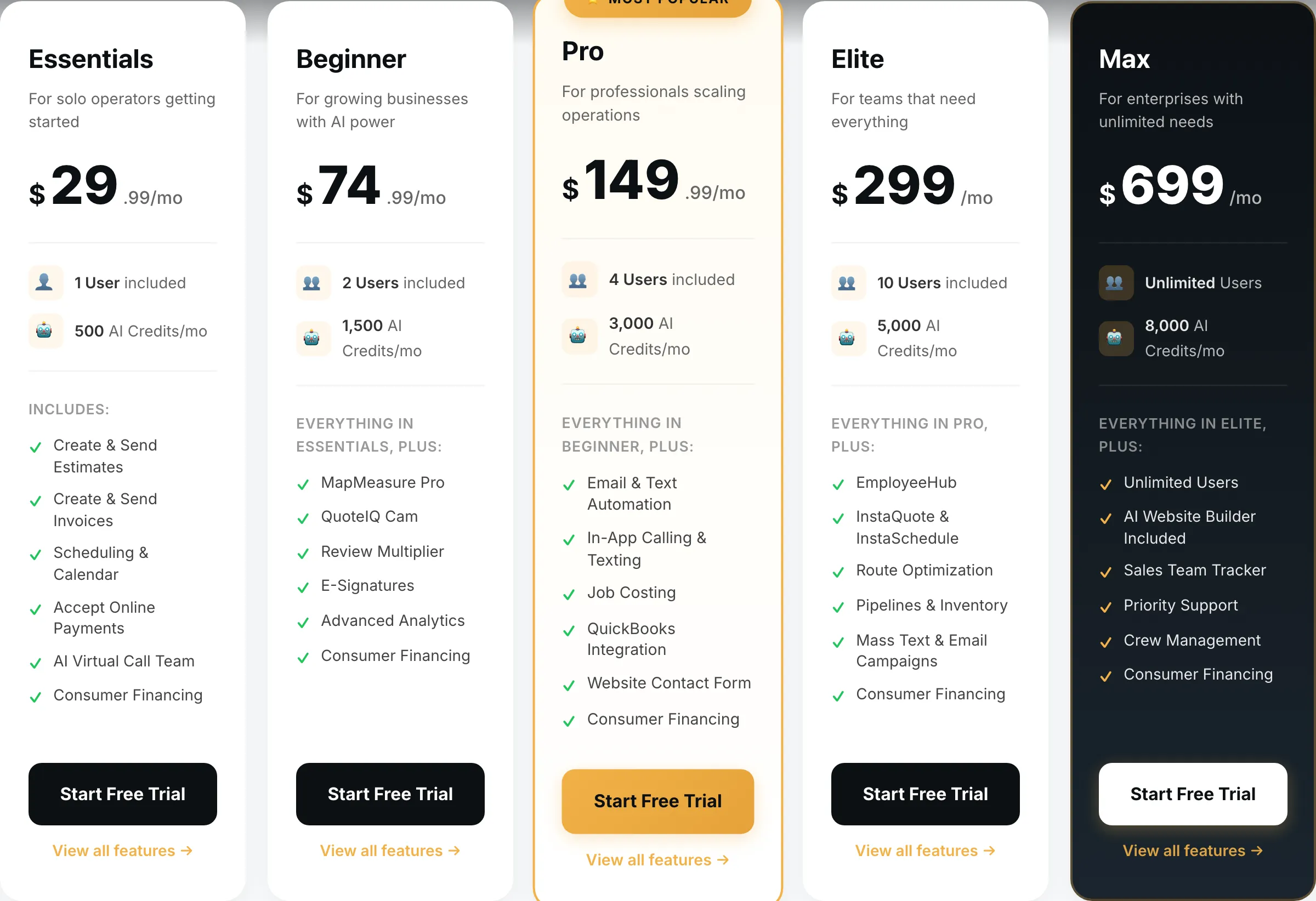
What it does well
- Cheapest real entry point of anything in this category — $29.99 gets a working quote-to-invoice loop, not a crippled trial tier.
- MapMeasure Pro measures a property off satellite imagery, which is the actual job on a lawn, driveway or roof quote.
- Every tier includes the features. No add-on menu bolted on at checkout.
What it does badly
- Smaller company than the incumbents. Fewer integrations, and you will occasionally be the person filing the bug.
- Built around exterior and outdoor trades. If you run commercial mechanical, this is the wrong shape.
- Seat counts are tight below Elite — a four-person crew is already on the $149.99 tier.
Who it fits: Solo operator to a four-person crew, mostly exterior cleaning and outdoor work.
Housecall Pro — once you have staff
$79/mo · Five or more staffJobber’s closest competitor, priced for teams rather than solos, with stronger dispatch and marketing tooling.
Essentials at $189/mo includes five seats, which beats Jobber’s per-seat maths once you are past four people, and employee GPS is genuinely useful when you have crews and machines spread across sites.
Structured photo reports are the strongest of the four for documenting site condition before and after — worth having when a homeowner decides your tracks damaged their driveway.
It is built for service trades rather than project work, so expect to bend it a little. Ignore Basic at $79 for one user.
What it does well
- Five seats included on Essentials is the best seat-per-dollar deal of the three once you are past two people.
- Dispatch and routing are stronger than Jobber’s at the equivalent tier.
- Recurring service plans on Max are genuinely good if you sell maintenance contracts.
What it does badly
- Worst entry price in the category: $79/mo for a single user, 60% more than Jobber Core for less.
- Extra seats on Essentials are $100/mo — the most expensive seat of any tool here.
- Add-on pricing is not published. You will get those numbers on a sales call, not off the website.
Who it fits: Two to eight people. The seat maths only starts working in your favour once you have a crew.
ServiceTitan — the wrong category
Quote only · Large service operationsEnterprise field service management for multi-truck operations, sold through a sales process rather than a pricing page.
Named because a roundup omitting the market leader is an advertisement.
Built for dispatched residential service calls with price books, memberships and van parts. Excavation is project-based equipment work. No published pricing, an annual contract, a paid implementation.
What it does well
- Nothing else touches it for a large operation: reporting, payroll, inventory, call tracking, financing at the door.
- Built for a business where somebody’s full-time job is dispatch.
What it does badly
- No published pricing, an annual contract and an implementation fee. This is not a tool a solo operator buys.
- For a one to four person crew it is the wrong product at any price — you would use perhaps a tenth of it.
Who it fits: Ten trucks and up, with an office manager whose job includes running the software.
How we picked
Prices read off each vendor’s own pricing page on 31 August 2026, no-commitment monthly rate with seats added.
For excavation we weighted multi-day job handling, day-rate and mobilisation line items, deposits, and site documentation. We deliberately excluded earthwork takeoff and machine control, which are separate product categories, and we have said plainly that none of these four touch them.
We earn nothing from Jobber or ServiceTitan, and Jobber is the pick.
What we would do
Owner-operator, residential dirt work: QuoteIQ at $29.99 or Jobber Core at $49.
Two or three machines with staff: Jobber Core with seats, or Housecall Pro Essentials at $189 past four people.
Commercial sitework bidding off surveys: none of these. Price construction estimating software instead.
Questions operators actually ask
What software do excavation contractors use?
It splits by the kind of work. Residential dirt work — footings, drainage, driveways, pads — runs fine on a general field service tool like Jobber. Commercial sitework with cut-and-fill volumes and grade control needs construction estimating and machine-control software instead, which is a different category entirely.
Do any of these calculate cut and fill?
None of them. Cut-and-fill volume takeoff belongs to construction estimating software like Trimble or AGTEK, and grade control is a machine system. If your bidding depends on earthwork volumes off a survey, nothing on this page is what you need.
How should I bill excavation work?
Day rate or hourly for the machine and operator, with separate lines for mobilisation, haul-off and disposal, and materials. Never quote a flat price for dirt work without a written scope on what happens if you hit rock, water or unmarked utilities — that clause is worth more than any software.
Can these track equipment hours?
Not machine hours. You can track labour time, and you can note machine hours in a job field, but none integrate with telematics. For a small owner-operator a maintenance log in a spreadsheet is the realistic answer.
Is field service software right for excavation at all?
For small residential dirt work, yes — it handles the quoting, scheduling and invoicing, which is most of the admin. For commercial sitework it is the wrong category and you should not force it.